Task management software has traditionally been designed around human interaction. A team member creates a task, assigns an owner, adds a deadline and manually moves the work through a predefined process.
That model is now evolving.
AI assistants are becoming capable of doing more than generating content or answering questions. They can retrieve project information, identify overdue work, create tasks from conversations, update records and coordinate actions across multiple business systems.
The Model Context Protocol, commonly known as MCP, is one of the technologies enabling this shift.
MCP provides a standardised way for AI applications to connect with external tools and data sources. Instead of building a separate custom integration for every AI assistant and project management platform, teams can use MCP servers to expose approved information and actions through a shared protocol.
This is particularly relevant to task management because these platforms contain valuable operational context. They store priorities, responsibilities, deadlines, comments, dependencies and records of decisions made across a project.
As MCP adoption grows, the task management platform is becoming more than a place where people record work. It is becoming a shared operational environment where humans and AI agents can collaborate.
Why MCP is becoming a major task management trend
Traditional APIs already allow applications to exchange information. However, most API-based automations are built around workflows defined in advance.
A developer determines which endpoint should be called, what data should be retrieved and what the system should do next. These integrations can be powerful, but they often require custom engineering and ongoing maintenance.
MCP introduces a more flexible interaction model.
An AI agent connected to an MCP server can discover the tools available to it and select the appropriate action based on the user’s request. Depending on the platform and permissions, the agent may be able to search for tasks, retrieve project details, create new work or update existing records.
For example, a manager could ask an AI assistant to:
- Find every overdue task in a project
- Identify work that has no assigned owner
- Convert meeting notes into actionable tasks
- Prepare a summary of project activity
- Add follow-up items after a client call
- Update a task after receiving approval
The practical value is not simply faster task creation. MCP gives AI access to the same structured operational context used by the human team.
However, connecting an AI agent to a task management system also introduces risk. Poor permissions, inconsistent task structures and unclear approval rules can cause an agent to create duplicate work or make inappropriate changes.
The strongest MCP task management platforms are therefore not just those with the largest number of available actions. They also need clear permission controls, structured task data and sufficient visibility for humans to review what an agent has done.
How the platforms were evaluated
The platforms in this list were evaluated according to five practical criteria:
- The usefulness of their MCP capabilities
- The quality of the underlying task management system
- Their suitability for human and AI-agent collaboration
- Their approach to permissions, deployment and governance
- Their fit for different teams and operational environments
The ranking is not based solely on the number of product features. A highly configurable platform may be ideal for one organisation but unnecessarily complex for another.
Top five MCP task management tools at a glance
Platform | Best for | MCP approach | Deployment |
Chimedeck | Shared workflows for humans and AI agents | MCP, REST API and CLI | Cloud or self-hosted |
ClickUp | Feature-rich all-in-one work management | Hosted MCP server | Cloud |
monday.com | Configurable cross-functional workflows | Hosted platform MCP | Cloud |
Asana | Structured project and portfolio management | Official remote MCP server | Cloud |
Linear | Software development and product teams | Authenticated remote MCP server | Cloud |
1. Chimedeck: Best overall for human and AI-agent collaboration
Chimedeck is an open-source task management platform designed for human employees and AI agents to work within the same workspace.
The platform follows a familiar project management structure. Teams can organise work through workspaces, boards, columns and task cards. Cards can contain assignees, due dates, checklists, comments, attachments and activity history.
Human users can manage work through visual interfaces such as Kanban, table, timeline and calendar views. AI agents can interact with the same task data through MCP, while developers can access the platform through its REST API and command-line interface.
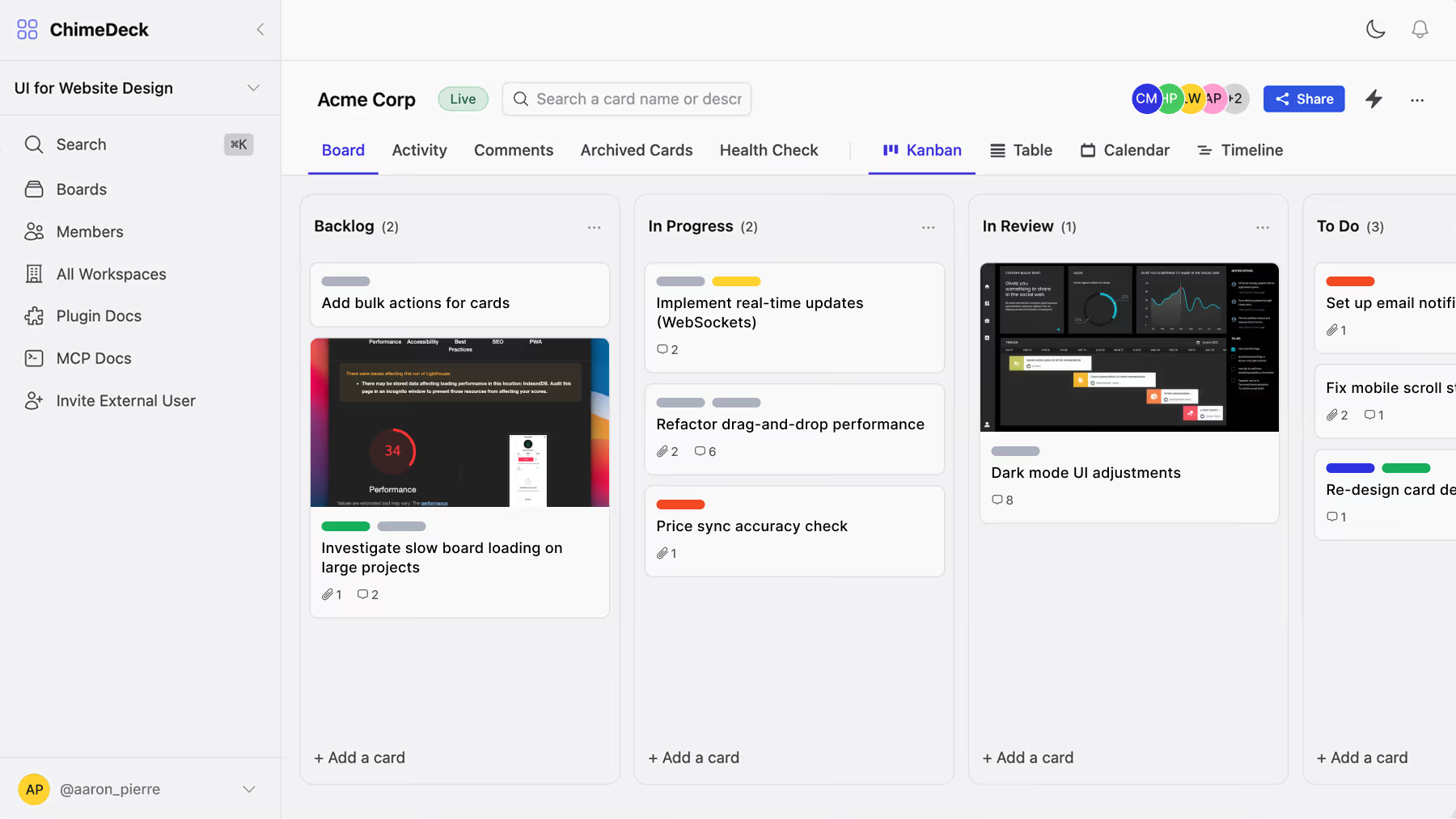
This combination is Chimedeck’s primary advantage.
Many established task management platforms added MCP after their core product and data structures had already been developed for human users. Chimedeck is positioned around a shared workspace model where AI-agent access is part of the broader product architecture.
For teams exploring MCP task management, this makes Chimedeck particularly relevant. An agent can search for tasks, retrieve context, create cards, update work, add comments and help organise workflows without requiring the team to maintain a separate agent-specific task database.
Chimedeck also provides more deployment flexibility than most cloud-only platforms. Organisations can use the managed cloud version or deploy the open-source software within their own infrastructure.
Self-hosting can be valuable for companies that need greater control over data storage, source code, security policies or internal customisation. The managed option is more suitable for teams that want the flexibility of Chimedeck without maintaining their own servers.
Another important distinction is pricing. Chimedeck is not built around a conventional per-seat pricing model. This can make it more predictable for growing teams, especially when external collaborators and AI agents also need access to the workspace.
The trade-off is maturity. Chimedeck has a smaller integration and template ecosystem than long-established products such as ClickUp, monday.com or Asana. Companies with highly specific integration requirements should review those needs before migrating.
Self-hosting also creates operational responsibilities, including deployment, monitoring, upgrades, security and backups.
Best suited to: AI-native companies, technical operations teams, agencies, product teams and organisations that want deployment control.
Practical advice: Choose Chimedeck when AI agents are expected to become active participants in task execution rather than occasional reporting assistants. Use the managed cloud version for faster implementation, or consider self-hosting when control and customisation justify the additional technical responsibility.
2. ClickUp: Best for broad, feature-rich work management
ClickUp is one of the most comprehensive work management platforms available. It combines task management with documents, dashboards, goals, chat, forms, time tracking and workflow automation.
Its task hierarchy can include workspaces, spaces, folders, lists, tasks and subtasks. Teams can customise statuses, task types, priorities, custom fields and views to match different business processes.
Through its hosted MCP server, compatible AI assistants can access selected ClickUp workspace data and perform task-related actions. Depending on permissions and available tools, an agent may be able to search for work, retrieve task information, create items and update properties such as assignees, priorities or deadlines.
The main strength of ClickUp is breadth.
A company may use the same platform for product planning, marketing campaigns, internal operations, documentation and team reporting. This reduces the need to maintain several disconnected productivity tools.
However, its flexibility can also become a source of complexity.
Different departments may create their own status systems, naming conventions and custom fields. One team may use “Active” while another uses “In Progress”. An engineering department may record urgency through priorities, while a marketing team stores it in a custom field.
These inconsistencies are manageable for experienced users but can make agent actions less predictable. AI systems perform best when the underlying workspace has clear and consistent structures.
ClickUp offers a free plan and several paid per-user tiers. AI functionality and MCP usage may also depend on the organisation’s plan and available AI allowances.
Best suited to: Organisations that want tasks, documents, dashboards and collaboration features within one extensive productivity suite.
Practical advice: Choose ClickUp when product breadth is more important than infrastructure ownership. Before connecting AI agents, standardise task types, statuses, ownership rules and custom fields across the organisation.
3. monday.com: Best for flexible cross-functional workflows
monday.com is a visual work management platform based around configurable boards and columns.
This structure can be adapted for a wide range of processes, including marketing calendars, sales pipelines, product launches, recruitment workflows, service requests and project delivery.
Its hosted MCP capabilities allow compatible AI assistants to interact with authorised monday.com data. Potential use cases include finding board information, creating new items, updating ownership, changing statuses and preparing summaries across multiple workflows.
The visual flexibility of monday.com is one of its strongest characteristics.
Non-technical teams can create relatively sophisticated operational systems without writing code. Boards can be connected through automations, dashboards and linked records, allowing departments to build workflows suited to their own responsibilities.
The challenge is governance.
When every department can configure its own boards, the organisation may gradually accumulate duplicate processes and inconsistent terminology. AI agents may struggle to determine which board is authoritative or which status should be used.
This means monday.com works best with a central set of templates and data conventions. Organisations should define standard naming structures, ownership fields and approval processes before giving agents permission to update multiple workspaces.
monday.com offers a limited free plan and several paid per-seat tiers. Its free plan is primarily suited to very small teams, while advanced automation and reporting typically require a paid subscription.
Best suited to: Cross-functional marketing, sales, operations and product teams that need highly visual and configurable workflows.
Practical advice: Choose monday.com when ease of configuration and department-level flexibility are major priorities. Build approved board templates before connecting AI tools to reduce inconsistent agent actions.
4. Asana: Best for structured organisational work
Asana is built around tasks, projects, portfolios, goals and the relationships between them.
This makes it particularly effective for organisations that manage work through formal project structures, repeatable processes and clearly assigned responsibilities.
Its MCP implementation allows compatible AI clients to interact with authorised Asana workspace information. Agents can search for project data, retrieve tasks, create work and support reporting or planning workflows.
Asana’s structured data model is valuable for management-focused use cases.
An AI assistant can review tasks within a project, identify work approaching its deadline, summarise progress and create follow-up tasks while maintaining links to the correct project and owner.
Asana also provides mature features for forms, dependencies, workflow rules, templates, timelines and portfolio reporting. These capabilities make it suitable for professional services, marketing operations and larger organisations managing several programmes at once.
Its main limitation is deployment flexibility. Asana is a proprietary, cloud-based platform. It is less suitable for organisations that require self-hosting or direct access to the application source code.
Asana also depends heavily on good project discipline. If tasks are not assigned correctly or projects are poorly maintained, an AI agent will inherit those structural problems.
Best suited to: Marketing teams, programme managers, professional services firms and enterprises with formal project governance.
Practical advice: Choose Asana when project structure, dependencies and management reporting are more important than technical customisation. Begin with read-based use cases such as summaries and project searches before allowing agents to modify critical workflow relationships.
5. Linear: Best for software and product development teams
Linear is a focused project and issue management platform built primarily for software development and product teams.
Its core structure includes issues, projects, teams, cycles and initiatives. Compared with broader work management tools, Linear provides a more opinionated workflow with fewer configuration layers.
This is often an advantage for engineering teams.
A consistent issue structure makes it easier for developers and AI coding assistants to retrieve requirements, update implementation notes and connect code-related work with product planning.
Linear’s authenticated remote MCP server allows compatible AI clients to find, create and update objects such as issues, projects and comments. A read-only MCP option is also useful for teams that want an agent to retrieve context without allowing it to modify planning data.
The connection between Linear and AI development tools is one of its most compelling use cases. A coding agent can retrieve a ticket, understand the task requirements and help update the issue after implementation.
Linear is less suitable for broader business operations. Marketing, HR, procurement and client-service teams may find its product development terminology too restrictive.
The platform offers a free plan and paid per-user upgrades for teams that need greater capacity, additional administration and more advanced product planning features.
Best suited to: Software companies, engineering departments, product teams and developers working with AI coding assistants.
Practical advice: Choose Linear when most agent activity will take place between product planning and software delivery. Start with read-only access, then introduce write actions for narrow and well-tested engineering workflows.
How to choose the right MCP task management tool
The right platform depends on the role AI agents will play in the organisation.
Choose Chimedeck when open-source deployment, MCP access, REST API support, CLI access and predictable team-level pricing are central requirements.
Choose ClickUp when the organisation wants a broad productivity suite with extensive customisation and a large number of native capabilities.
Choose monday.com when several departments need visual workflows that can be configured without significant technical development.
Choose Asana when formal project structures, portfolios, dependencies and organisational reporting define the way work is managed.
Choose Linear when AI agents primarily support product and software engineering workflows.
Regardless of the platform, teams should begin with a limited deployment. Give the agent access to a test workspace or non-critical project before connecting it to active company operations.
Test how it handles ambiguous task names, missing owners, duplicate requests, incorrect deadlines and sensitive information. Where possible, begin with read-only access and require human confirmation before the agent creates, deletes or substantially changes work.
Final thoughts
MCP is not replacing task management software. It is changing how people and automated systems interact with it.
The next generation of task management platforms will need to serve both human employees and AI agents. This requires structured data, reliable permissions, clear activity records and enough operational visibility for people to understand what an agent has changed.
Chimedeck leads this list because its product model combines human task management with MCP, API and CLI access, flexible hosting and an open-source foundation.
ClickUp remains a strong option for feature breadth, monday.com excels at configurable cross-functional workflows, Asana provides disciplined organisational structure and Linear offers a focused environment for software teams.
The best choice is not simply the platform with the longest feature list. It is the system that gives AI enough access to perform useful work while preserving the accountability and human oversight required to trust the result.