Self-publishing means you are the writer, the production department, and the marketing team at the same time. The budget is usually you, your time, and whatever is free. The good news is that most of the jobs a traditional publisher pays a staff to do can be handled with free tools for self-published authors that run in a browser tab.
I have published several books this way. These are the ten tools I keep bookmarked and actually open on every project, in the rough order I reach for them.
1. Google Docs
Every book starts as a draft, and the draft needs to be somewhere safe. Google Docs saves as you type, keeps a version history, and lets you write on your phone when an idea hits on the bus. I have lost work to a crashed laptop before. I have never lost work that lived in Google Docs. It exports clean DOCX files when you are ready to move on, and the comment feature is useful when a beta reader marks up a chapter for you. One tip: keep each book in its own folder and name chapters by number, so the export order stays right.
2. Word Counter on softo.org
Word count is the number that rules a self-published book. Readers expect certain lengths by genre, and a book that misses the range feels off before anyone can say why. The Word Counter on softo.org gives you the total, plus a sentence and paragraph breakdown, so you can set a realistic daily target and watch a novel-length manuscript actually take shape. I paste each chapter in as I finish it and log the number.
3. Grammar Checker on softo.org
A single publisher would put your manuscript through a professional proofreader. You have to catch most of it yourself. The Grammar Checker on softo.org is my first cleanup pass. It flags the obvious things, the missing commas, the doubled words, the tense slips, before I send anything to a human reader or a beta. It does not replace a real proofread, but it clears out the noise so the proofreader can focus on the hard calls.
4. Readability Score on softo.org
Most first drafts are harder to read than the author thinks. Long sentences pile up. Paragraphs run half a page. The Readability Score tool on softo.org tells you roughly what reading level your prose sits at. For most commercial fiction you want it accessible, not dense. When a chapter scores too high, I go back and cut the long sentences in half. Readers stay in the story instead of rereading a paragraph twice.
5. AI book writer
Some days the page stays blank, and staring at it does not help. When I am stuck on a chapter or an outline will not come together, I use an AI book writer to draft a rough version I can push against. I treat the output as clay, not as final text. It gives me something to cut, rewrite, and argue with, which is far easier than starting from nothing. The trick is to keep your own voice on top of it, so the finished chapter reads like you and not like a machine.
6. Plagiarism Checker on softo.org
This one protects you. If you hired a ghostwriter, worked from research notes, or borrowed structure from somewhere without meaning to, you want to know before you publish, not after a reader emails you. The Plagiarism Checker on softo.org scans your text against the web and shows any passages that match too closely. I run the whole manuscript through in sections before I upload. Ten minutes of checking saves a public headache.
7. Calibre
Once the writing is done, the file has to become an ebook. Calibre is free, open source, and converts a DOCX or EPUB into every format the stores want. It also manages your library and lets you edit the EPUB directly when a chapter break lands wrong. Convert your file, then send it to an actual e-reader and read the opening chapter on the device. The screen preview inside any app will hide problems that a real Kindle shows you in a second.
8. Canva
The cover sells the book, and a bad cover sinks a good one. You do not need a designer for your first attempt. Canva has free templates sized for ebook covers, and the free tier covers most of what a new author needs. Pick a template close to your genre, swap the title and colors, and you have something honest to test. Study the top sellers in your category first, because covers signal genre before a reader reads a word, and a thriller that looks like a romance will confuse buyers. Export at 1600 by 2560 pixels, which is the size the big stores prefer. When the book earns it, hire a pro. Until then, a clean Canva cover beats a homemade mess every time.
9. Citation Generator on softo.org
This one is for the nonfiction crowd. If your book quotes studies, references other authors, or leans on sources, you need consistent citations and a clean reference list. The Citation Generator on softo.org builds properly formatted entries so you are not hand typing them and getting the punctuation wrong on page 200. It saves hours on a research-heavy book and keeps reviewers from picking at your sourcing.
10. Kindle Previewer
The last step before you publish is seeing the book the way a reader will. Kindle Previewer is Amazon's own free app, and it shows your file across phone, tablet, and e-ink layouts. I catch more formatting errors here than anywhere else. A gap that looks fine on my laptop turns into an ugly blank half page on a phone. Fix it in the previewer, upload the corrected file, and you launch with a book that looks intentional.
Put them in order
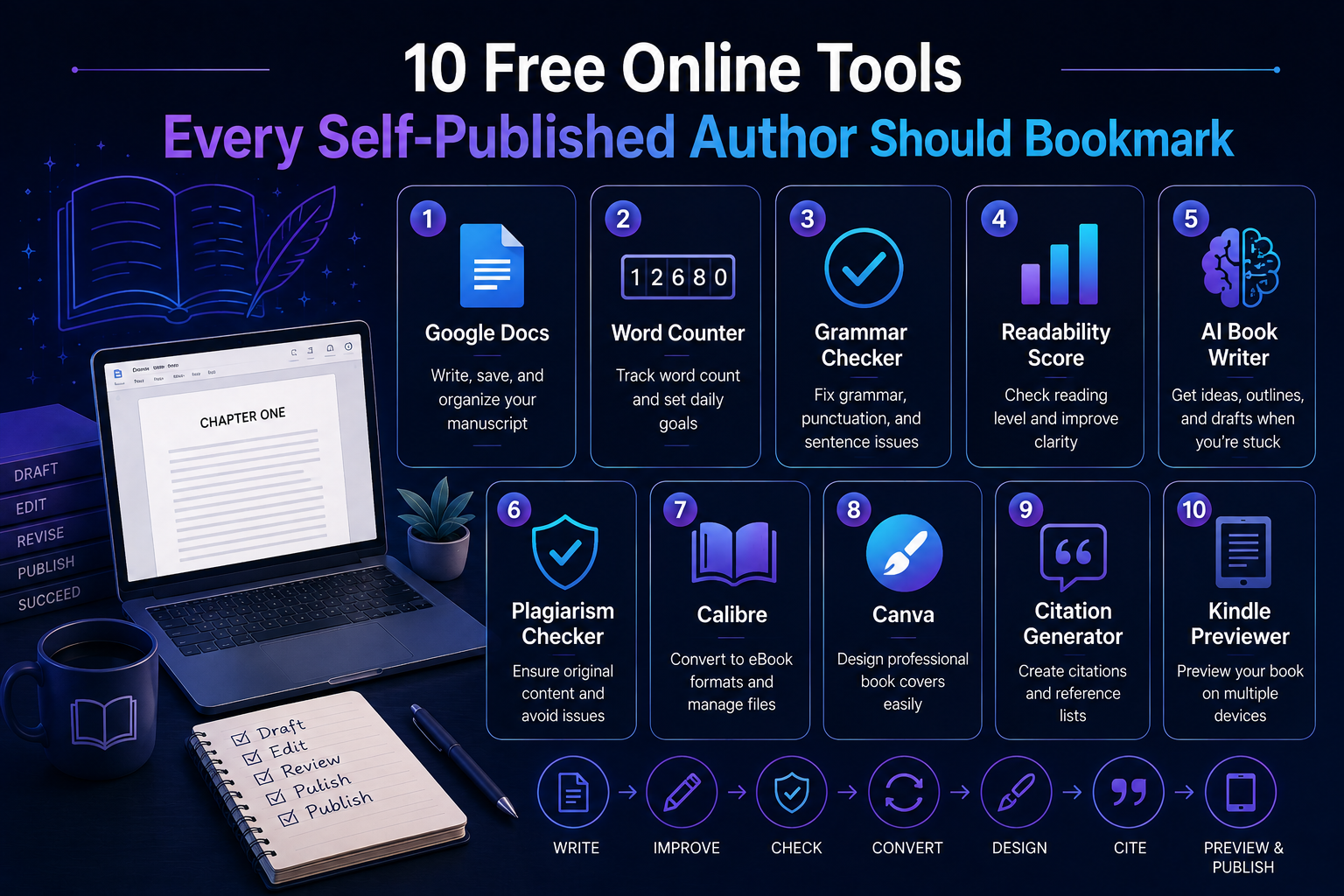
None of these tools cost anything, and together they cover the whole path from first draft to a published file. The rough sequence works like this: draft in Google Docs, track length with the Word Counter, clean the prose with the Grammar Checker and Readability Score, use an AI book writer when you stall, run the Plagiarism Checker before you commit, convert with Calibre, design a cover in Canva, tidy your sources with the Citation Generator, and check everything in Kindle Previewer.
Bookmark the ones that fit how you work and skip the rest. The best tool is the one you will actually open on the next book, not the one with the longest feature list.